Learn anything, from anyone
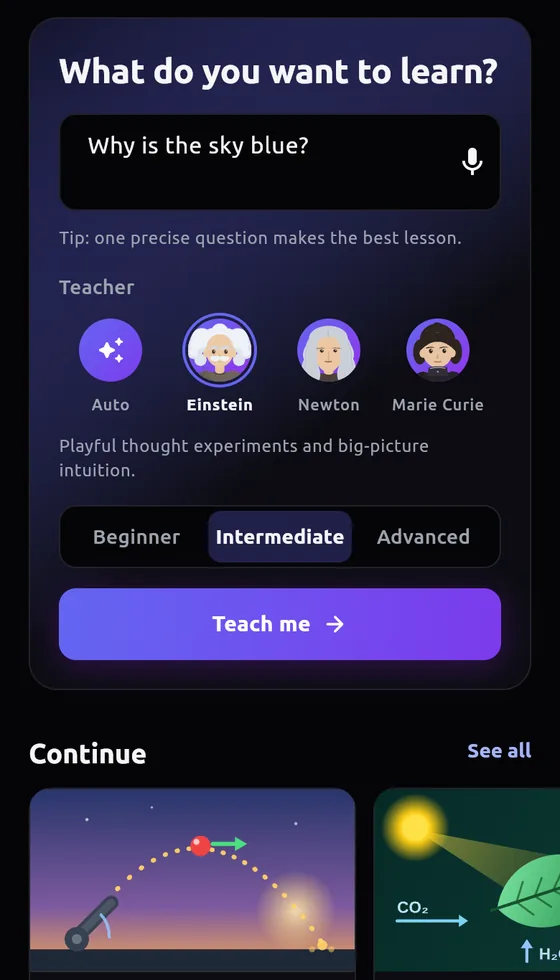
Ask for any topic and pick a teacher: Einstein, Curie, Tesla, Da Vinci and more. Yapademy builds a narrated lesson with simulations you can play with, and a quiz to check what stuck.
Free to start. No install, it runs in your browser.
- Free lessons, no account
- Narrated in your teacher's voice
- Private by design
See it in action
Pick a topic. Watch Yapademy build a narrated interactive lesson.
Pick a lesson
It builds right here, narrated by its teacher. Then drag, press and play with it.
Building lesson…
Meet your teachers
Each teacher has their own voice and teaching style. Tap a teacher to hear them. Not sure who fits? Auto matches one to your topic.
Teachers are AI characters inspired by historical figures, with AI-generated voices. Not affiliated with or endorsed by those figures or their estates.
How it works
Ask for a lesson
Type or say what you want to learn. Pick a teacher and a difficulty.
Yapademy builds it
The AI writes and assembles the full lesson in your teacher's style:
- Step-by-step explanations
- Narration script in persona
- Interactive scenes and diagrams
- A quiz deck to test yourself
Learn hands-on
Play the narration, drag the sims, quiz yourself. Stuck? The on-device tutor has read the lesson.
What you get
Generate any lesson
Ask for a topic, difficulty, and teacher persona. Yapademy builds the lesson, visuals, interactions, and quiz deck.
Persona narration
Every lesson is written to be read aloud, and plays in your teacher's voice once the local model is installed.
Simulations you can touch
Circuits, ramps, orbits, graphs, sliders, and diagrams you can manipulate instead of passively reading.
Chat that knows the lesson
Ask follow-ups while you learn. The on-device AI sees the active lesson and keeps the conversation private.
Fresh quiz questions
Want more practice? Generate new questions from the current lesson. No reload, nothing leaves your device.
Voice input
Speak your prompts and questions instead of typing. Keep learning offline once models and lessons are cached.
Inside Yapademy
Your AI, Your Device, Your Data: How On-Device AI Works
Yapademy runs its AI models locally on your phone or browser. No external servers see your private learning chats. Here is how and why it works.
Read more
Why Interactive Tutorials Beat Videos and Textbooks
Dragging a slider teaches you more than reading a paragraph, and active learning research backs it up. Discover why hands-on simulations are far superior.
Read more
Welcome to Yapademy
Generate highly interactive tutorials on any topic, chat privately with an on-device AI tutor, and quiz yourself with endless personalized questions.
Read moreFAQ
Start learning today
Build your first lesson
in seconds
Narrated lessons, hands-on simulations, fresh quizzes, and a private AI chat. Download once, then keep learning offline.
Get Started